

Getting started on Crane is as easy as ABC. Follow these three steps to create an account.
How to create an account on Crane
Step 1: Download the Crane app from the Google Play Store or App Store. Select the sign-up option. Choose your country of residence and click “Proceed.”

Step 2: Choose what you’d like to use Crane for. You have three options, as shown in the image below:

If you choose the first option (“Buy and send out crypto”), you’ll get an error response because you can neither engage in peer-to-peer trading nor send crypto to other wallets on crypto.
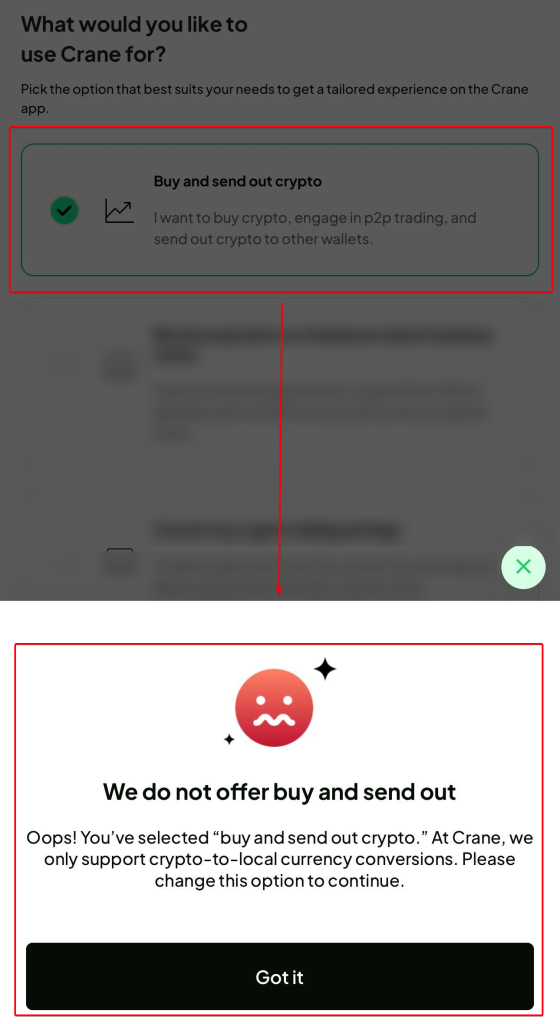
Therefore, you can only continue your registration after selecting one of the other two options (“Receive payment as a freelancer and/or business owner” and “Convert my crypto trading earnings”) because those are the services Crane offers.
Step 3a: Fill in the details (name, email address, and password) on the signup page. Create a strong password with at least eight characters containing upper and lower case letters, a digit, and a special character. Strong passwords improve your account security.
Step 3b. Enter the one-time password (OTP) sent to your registered email. Once you do, you can use the Crane app to receive payment from anyone.

If you have any account opening issues, contact [email protected] to resolve your complaints.
Frequently Asked Questions about creating an account on Crane
1. How long does it take to receive OTP on Crane?
It takes ten minutes to receive OTPs. However, a poor network from your internet service provider (ISP) may delay it. Request a new OTP after ten minutes if you have delays. Otherwise, contact us at [email protected] to resolve the issue.
2. What’s the meaning of Know Your Customer (KYC) on Crane?
Know Your Customer (KYC) is a mandatory requirement from the Central Bank of Nigeria (CBN) for identifying clients of financial businesses, like Crane. KYCs are necessary for account security, regulatory compliance, and accountability. Tier 0, Tier 1, Tier 2, and Tier 3 are the KYC levels on Crane. The table below explains the requirements and limits for each tier.
| Requirements & limits | Tier 0 | Tier 1 | Tier 2 | Tier 3 |
| Phone number | Not required | Required | Required | Required |
| Required | Required | Required | Required | |
| National Identity Number (NIN) | Not required | Not Required | Required | Required |
| Identity documents (international passport, driver’s license, and National ID card) | Not required | Not required | Not required | Required |
| Selfie scan | Not required | Not required | Not required. It only applies when you don’t have access to the phone number attached to your NIN. | Required |
| Address verification | Not required | Not required | Not required | Required |
| Crypto conversion limits | NA | can receive and covert unlimited crypto | can receive and covert unlimited crypto | can receive and covert unlimited crypto |
| Daily withdrawal limit | NA | ₦500,000 | ₦2,000,000 | ₦10,000,000 |
| Single transaction withdrawal limit | NA | ₦500,000 | ₦1,000,000 | ₦2,000,000 |
3. What’s the meaning of Auto-Convert on the Crane app?
Auto-Convert is used for automatically converting virtual currencies to local currencies on Crane. Once you set the value, the conversion will take place automatically.
4. How do I change my password on the Crane app?
Follow the steps below to reset your password on the Crane app.
Step I: On the homepage, go to Settings

Step II: Click on “Change password” under Security

Step III: Add the current and new passwords, as required in the image blow, then click “Change password.”

Your password change will take place immediately. However, if you experience any delays, contact [email protected] to resolve the issue.


Excellent article. Keep writing such kind of information on your blog.
Im really impressed by your blog.
Hi there, You have performed a great job.
I’ll definitely digg iit and in my view suggest to my friends.
I’m confident they will be benefited from this website.
Also visit my web page; Clair
Hey! Do you use Twitter? I’d like to follow you if that would be okay.
I’m undoubtedly enjoying your blog and look
forward to new updates.