
Imagine you ran an advert that almost a third of the world population saw at once. That’s what Instagram ads guarantee. In January 2024, Instagram ads reached 1.65 billion people, representing 20.4% of the global population.
Instagram’s visibility is a blessing for business owners and creators because the more people they reach, the higher the chances of increasing sales and revenue. Indeed, Instagram ads generate sales: In 2025, 29% of customers buy directly from Instagram.
Despite the seeming effectiveness of Instagram ads, you need to do them right to get the best out of them. This piece will do justice to how to run a successful ad campaign on Instagram.
Types of Instagram ads
My personal unwritten rule of thumb is to understand a platform before running ads on it; otherwise, you risk losing money. On Instagram, ads come in different forms. This section explores the unique shapes they come in.
1. Photo or image ads
A picture is worth a thousand words. Photo ads are worth a thousand dollars and more. Photo ads are still images that include a brief caption, a call-to-action (CTA) button, and a link to an external website or landing page.
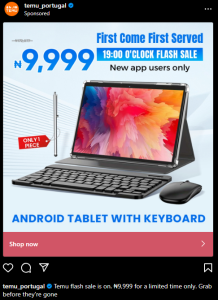
They’re effective for showcasing a single product/service or concept. Another benefit of photo ads is that you can repurpose organic content for them, helping you boost reach, engagement, and conversion.
Static images can be run on the feed, stories, and reels. To run photo ads, ensure the images are properly aligned. The recommended dimensions are listed below:
| Format | Aspect Ratio | Recommended size | Notes |
| Square | 1:1 | 1080 × 1080 | Works well for the feed and explore. |
| Portrait (vertical) | 4:5 | 1080 × 1350 | Ideal for mobile viewing. It grabs more attention. |
| Landscape (horizontal) | 1.91:1 | 1080 × 566 | For wide shots and panoramas. |
| Stories and reels | 9:16 | 1080 × 1920 | Great for immersive experiences. |
2. Video ads
It uses moving images to tell a story or sell a product. Videos offer a better immersive experience for users to engage with your content. KeyGroup, a UK-based growth agency, confirmed the heightened engagement video ads bring in 2025, when it revealed that videos generate 18-32% more CTR over image ads.
Engagement and experience, as users typically engage with short-form videos (<15 seconds). Video ads can be posted on your page, the explore section, stories, and reels.
3. Carousel ads
It’s a digital advertisement format for displaying multiple images and videos, including GIFs and memes, within a single ad unit. In 2024, carousels were the best-performing content type on Instagram, with an average engagement rate of 0.55% per post. The stars suggest that carousels are excellent for paid content designed to stimulate conversations.
4. Story ads
It appears between the user’s organic stories. It’s designed to blend seamlessly with regular user content, although labelled with CTAs like “Shop Now” or “Learn More.”
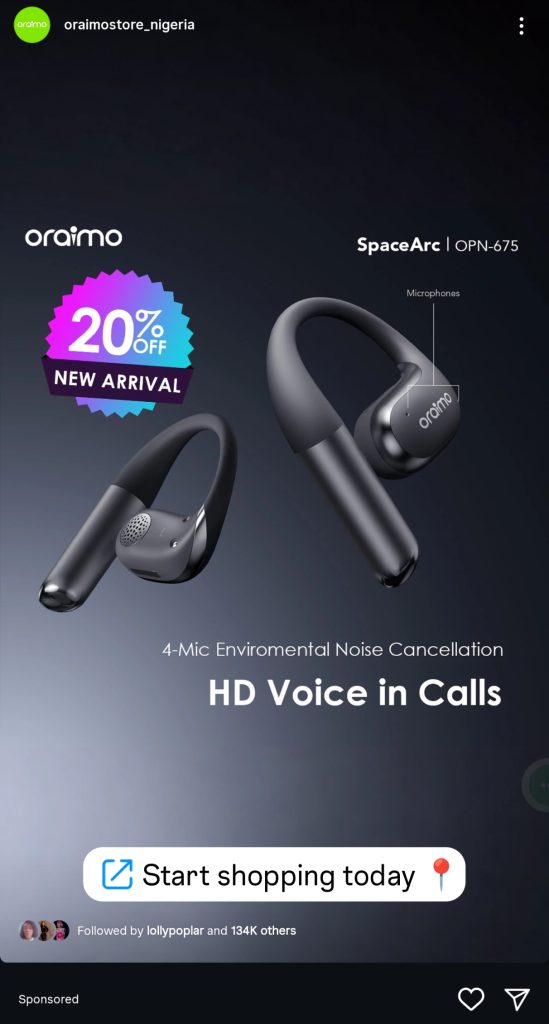
Source: An Oraimo story ad
5. Explore Ads
These are sponsored posts on Instagram’s Explore page, the area designated for discovering trending content and new creators. Paid explore content helps brands expand their content to the audience and improve brand awareness. Explore ads can come in photos, videos, and carousels.
6. Reel ads
They are sponsored videos (usually up to 60 seconds long) that show in between reels. If you want your paid content to set tongues wagging and reach more people, reels are the best fit to place it. In 2025, reels had the highest average comments (46) for large brands with followers under 100k. It also had the most impressions (590) on average for small accounts with less than 50k followers.
7. Shopping ads
It’s used to showcase products for direct sales. It lets businesses post products, tag them, and enable consumers to complete product purchases without leaving Instagram. Shopping ads can be highlighted through videos and single images and/or displayed on explore feeds and reels.
8. Collection ads
It helps businesses use immersive layouts to showcase a group of curated products. Collection ads are highly customisable, and their interactive formats improve engagement and conversion.
Summarily, here are the ad formats on Instagram and how best to use them:
| Instagram ad formats | Benefits |
| Shopping | Excellent for direct sales and quick conversions. |
| Reels | Excellent for engagement, visibility, and conversion. |
| Collection | Perfect for brand storytelling, engagement, and product discovery. |
| Explore | It’s best for product discovery and visibility |
| Carousel | Used for product awareness, product education, and sales. |
How to run Instagram ads with Meta Manager
The Meta Ads Manager is a centralised platform for creating, managing, and analysing sponsored posts across Facebook, Instagram, Messenger, and WhatsApp. To create Instagram ads using it, follow the step-by-step process outlined below.
Step 1: Log in to the Meta Ads Manager. Click on “Campaigns” on the left-hand pane

Step 2: Determine your ad objective using + Create on the Ads Manager page
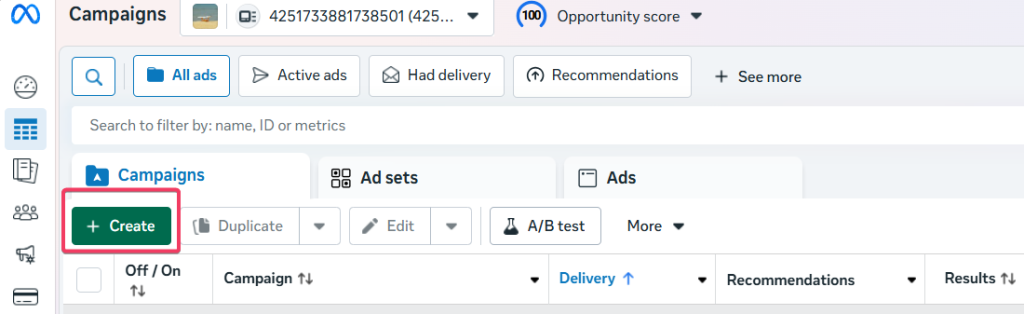
On the new page, use the “choose a buying type” dropdown to understand how to plan your ad campaigns. You have two options: Auction and Reservation.
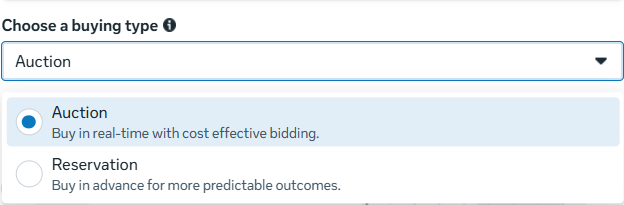
Reservation lets you plan and buy your campaigns in advance, with predictable performance goals and controls over your frequency, per Meta. The ads can be planned on Facebook and Instagram. You’re restricted to awareness and engagement as the campaign objective if you select Reservation, as shown below:
Auction, on the other hand, offers more efficiency and flexibility, with less predictable results. The ads can be placed across Facebook, Messenger, Instagram, WhatsApp, and Meta Audience Network. Auction offers six campaign objectives: awareness, traffic, engagement, leads, app promotion, and sales, as shown below:
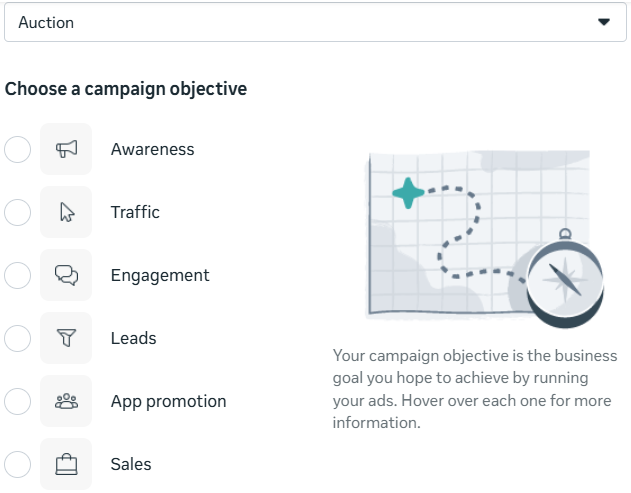
Step 3: Name your campaign
After selecting your buying type (Auction or Reservation) and campaign objective, enter a unique name for your campaign in “Campaign name” for effective performance analysis.
Other categories you should consider filling are:
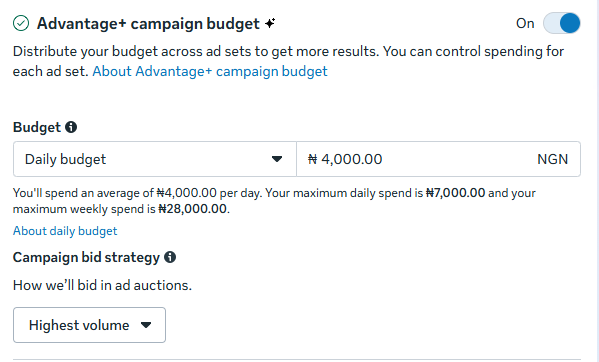
a. Advantage+ campaign budget (or Campaign budget): It automatically manages your campaign budget across ad sets to achieve the overall best results. Here, you only need to set up one central budget, which will continuously distribute in real time to ad sets with the best opportunities throughout the campaign period.
To set the Advantage+ campaign budget, toggle the button on and fill in the budget (daily or lifetime) and the amount you intend to spend. A daily budget lets your ads run indefinitely based on your allotted amount for each day.
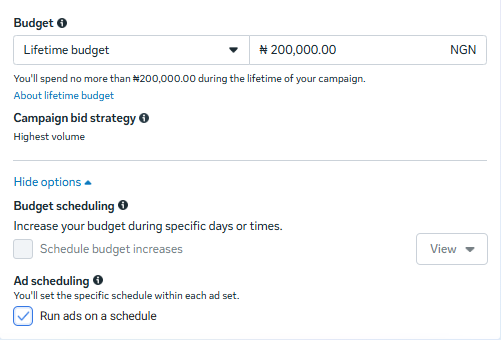
Lifetime budget ads run for a selected period. Here, you can pick a specific schedule for each ad set. You can also configure the budget to increase based on the selected days or times you want your ads to run.
Determine the campaign bid strategy if your buying type is Auction. You have these options:
I). Highest volume prioritises delivery and conversions. It’s ideal for businesses where the cost per attendee is negligible.
II). Cost per result goal focuses on keeping expenses on the ad spend. For example, you may optimise for purchases by setting the cost amount to a cost per purchase to maximise profit. Meta, however, notes that adherence to cost per result goal limits isn’t guaranteed.”
III) Bid cap: It is a manual process that lets you set the bid across auctions instead of allowing Facebook to bid dynamically based on your cost or value goals. This is reserved for expert advertisers who understand predicted conversion rate calculations.
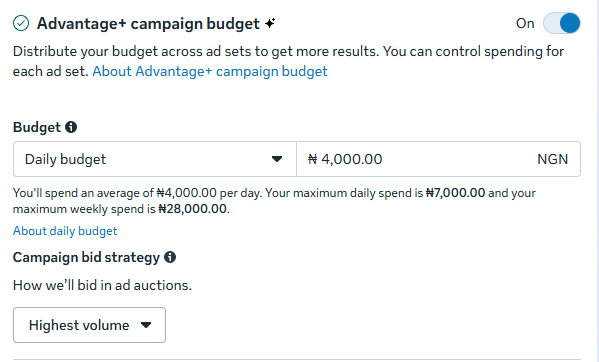
b) Use “Budget scheduling” to increase your budget on specific days and times based on when you anticipate peak demand.
c) Configure an A/B test to compare ad performance with different variations.
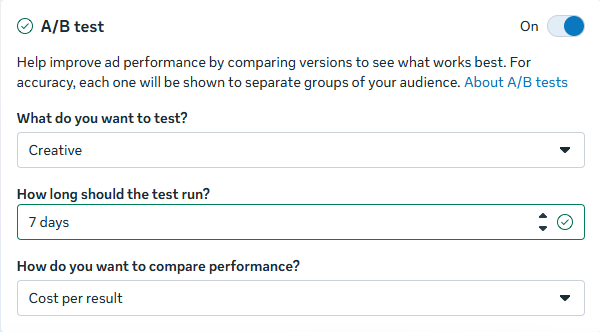
Choose one from “what do you want to test”. You have four options: Creative (it tells you the images, videos, or ad text that works best), audience (how your ideal customers are reacting to your campaign), placement (the effective places that work), and custom (how changing multiple variables affects ad performance).
Determine the length of the test through “How long the test should run”
Your comparison metric using the “How do you want to compare performance” dropdown (you have multiple options).
d) Add your ad categories through the “Special Ad Categories” option and the area/region you want to target.
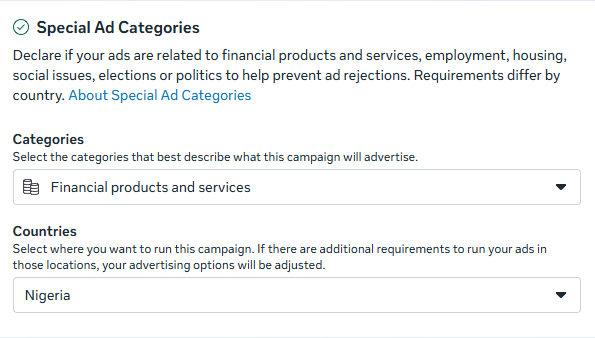
Do the following in the Ad set section
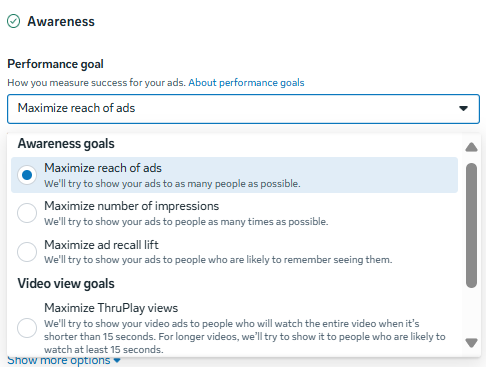
Step 4: Set your performance goal tied to the ad objective. For the test, I chose awareness, hence the options in the dropdown below are tailored to that metric:
Step 5: Choose the “Facebook page” you want to promote:

Step 6
Toggle the “Dynamic creative” button on to enable you to upload multiple creative elements, such as images and headlines, which Meta automatically combines to generate different ad variations for your audience. However, dynamic creative doesn’t work if sales or app promotion are your objectives. It also doesn’t work for ads in multiple languages, asset customisation, or sponsored posts with political content.
Step 7: Define your audience (very important to campaign success)
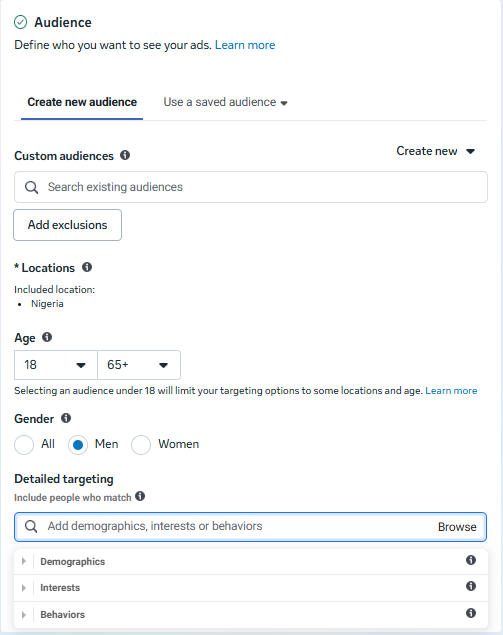
You can use “custom audience” to target people who have already interacted with your business or lookalike audiences to reach new people similar to your existing customers. To do this, click on Create new and filter as you deem fit.
Configure the age, location, and gender for more audience filtering. Use detailed targeting to improve audience filtering. In this section, you can select from categories such as interests, behaviours, and demographics to improve your ad target.
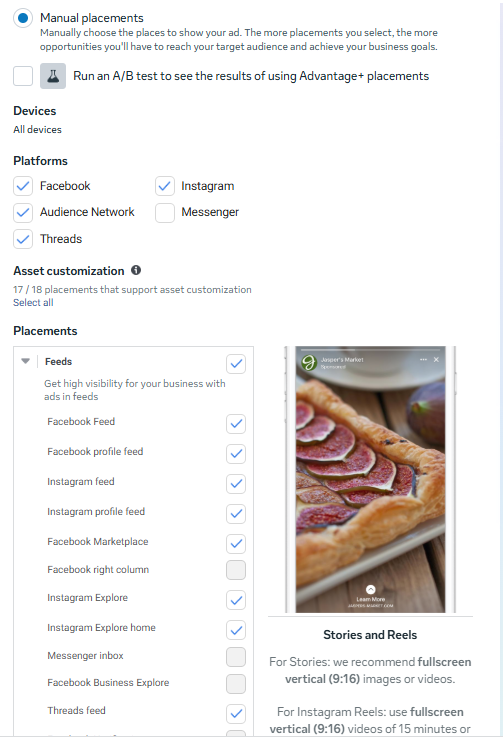
Placements allow you to decide the location of your ads across Meta’s products. The recommended Advantage+ placements use the Facebook delivery system to maximise your budget and show ads to more people across multiple placements where they’re likely to perform best.
Manual placements, on the other hand, require you to select the places your ads should be. Placement customisation cut across devices, platforms (Facebook, audience network, threads, Instagram, and messenger), and asset customisation, as shown below:
Step 8: Decide the creative design and ad format
If you’re collaborating with another brand or creator to boost performance, toggle the “Partnership ad” on and enter the partnership ad code, post ID, or post URL.
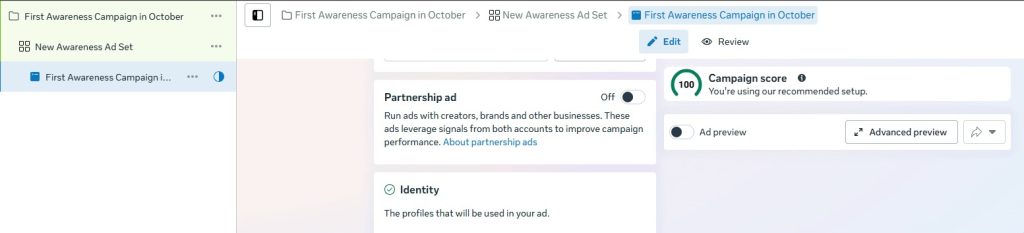
Selecting a partnership ad
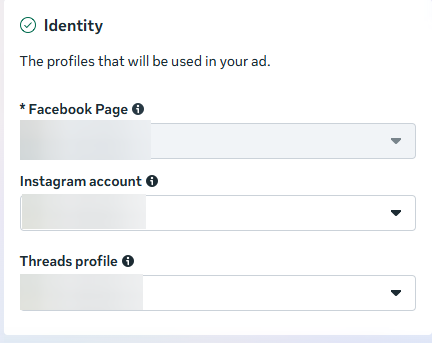
The next step is to select the profile (Instagram, Facebook page, or Thread) to run the ad.
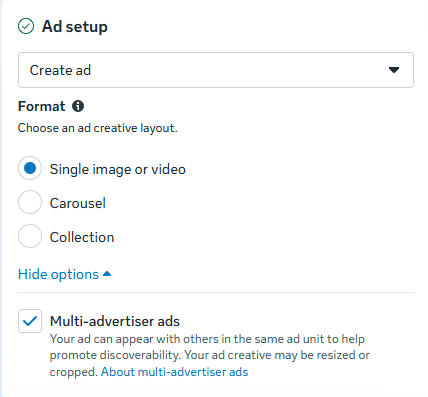
Proceed to the “Ad setup” section to select the format (carousel, collection, or single image).
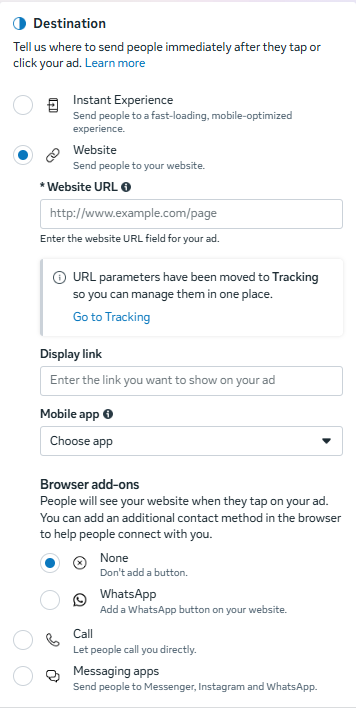
Configure where your users go after clicking your ads in the “Destination” section. This is the section to add your website link, messaging apps (Messenger, Instagram, or WhatsApp), and contact number as the next step when a potential customer clicks your ad. Use the “Browser add-ons” to set up additional contact details.
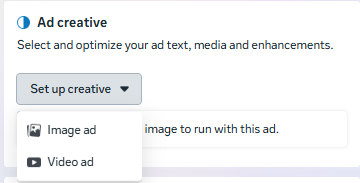
Select an ad creative (image or video ad):
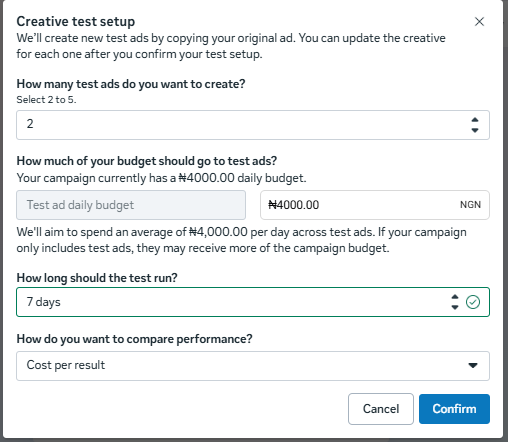
Use the “Creative testing” tab to optimise ad performance. You can compare up to five different versions of your creative in a test that helps ensure delivery to new test ads.
Once done, use “Event details” (optional) to set up reminders about your ad. Then enable automatic language translation through “Languages.”
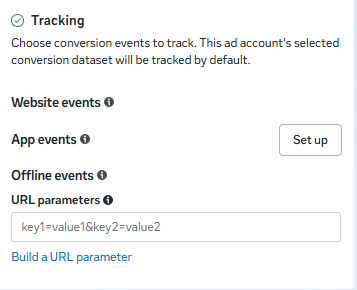
Under the Tracking section, choose any of the underlisted conversion events to monitor:
Once you’re done with the configuration, click publish.
How to receive international payments in Nigeria
After setting ads on Instagram, the expectation is to boost sales and conversions. But you still need one more thing: a secure financial platform to receive the payment from your international customers.
This is Crane, a blockchain-powered payment platform, comes in. We help you get paid instantly without fuss. Because we’re built on the blockchain, unlike traditional banks and financial platforms, you don’t have to worry about endless steps to open an account with us. You also don’t need guarantors and referees to own an account.
Other benefits of using our service for payment collection include:
- Zero fees on incoming deposits
- Instant and automated crypto-to-naira through Bank Direct
- Discount cards that remove 25%-100% of your crypto-to-naira conversion fees
- Better return on savings through Auto-Convert, which lets you automatically convert crypto to naira when the rates and prices of digital assets are high and favourable.


